Motion · 7 min read
Keying a title behind a portrait
The home page title sits between two layers cut from one photograph: a clean sky plate behind it and a keyed foreground in front. A Python pipeline grades the frame, finds the sky, builds a matte relative to each edge’s own darkness and strips sky colour from the edges. The browser adds two WebGL mist layers.
Why the title sits behind him
Putting a title behind the subject is an old film-poster and magazine-cover move: the letters read as part of the scene, not a label stuck on top. On the home page, the word SAPPY hangs in the sky of a misty hillside portrait, and the subject’s head passes in front of it. In editing terms it’s a composite: background, graphic, foreground.
The browser needs two things the photo doesn’t have: the sky with nobody in it, and a foreground with transparent sky around it. Both come from a one-off Python pipeline, run on the original 6000 × 3368 frame from a Nikon D7200 and processed at 2400 × 1347. It writes:
plate.jpg: the clean sky, extended upward for tall screens, about 15 KB.fg-1000.webptofg-2400.webp: the foreground with an alpha channel, about 130 KB to 531 KB.
Grade first, then find the sky
A luma key separates a subject from its background by brightness: pixels brighter than a threshold count as background. This photo suits one: pale, hazy sky behind dark hair, branches and hills. Brightness alone still fails, because the plaid shirt has pale blue checks that are almost exactly sky-coloured.
The pipeline grades the frame first, so the key and the final image agree. Highlights lose up to 28% of their saturation, a 20% S-curve adds contrast and the black point lifts slightly. Seed pixels are the ones that are both bright (luma above 0.66) and blue-leaning (blue minus red above 0.05).
L = luma(G)
blueish = G[..., 2] - G[..., 0]
seed = (L > 0.66) & (blueish > 0.05)
lab, n = ndi.label(seed)
top_ids = np.unique(lab[0, :]); top_ids = top_ids[top_ids > 0]
connected = np.isin(lab, top_ids)
# …
objs = ndi.find_objects(lab)
upper = [i + 1 for i, sl in enumerate(objs) if sl is not None and sl[0].start < H * 0.62]
pockets = np.isin(lab, upper) & ~inside_person
sky0 = connected | pocketsSeeds are grouped into connected regions with scipy.ndimage.label. Regions touching the top edge are sky. So are the pockets between leaves: any region whose top sits in the upper 62% of the frame. The exception is inside a garbage matte, a hand-drawn 18-point polygon around the figure. A garbage matte tells a keyer where not to look; this one stops the shirt checks from being read as holes in the sky.
A clean plate from the sky alone
A clean plate is the background with the subject removed. With no second photograph to use, the pipeline estimates one by normalized convolution: it blurs only the known sky pixels, then divides by the blurred mask. Every point gets the colour of the sky around it, even behind the figure.
def normconv(img, mask, sigma):
    m = ndi.gaussian_filter(mask.astype(np.float32), sigma)
    out = np.stack([ndi.gaussian_filter(img[..., c] * mask, sigma) for c in range(3)], -1)
    return out, m

B1, m1 = normconv(G, sky0, 30)
B2, m2 = normconv(G, sky0, 160)
B3, m3 = normconv(G, sky0, 600)
# … divide each by its blurred mask, then blend
w1 = np.clip(m1 / 0.25, 0, 1)[..., None]
w2 = np.clip(m2 / 0.10, 0, 1)[..., None]
Bfar = w2 * B2 + (1 - w2) * B3
B = w1 * B1 + (1 - w1) * Bfar
Three blur radii (30, 160 and 600 pixels) are blended by how much real sky each point had nearby. Because the plate is a smooth gradient, it’s stored only 640 pixels wide. It is also extended upward by its own height: phones crop the photo to a narrow slice, and the layout can push the picture down to make room for the title. In CSS the plate image sits at top: -100% with height: 200%.
A matte that respects soft edges
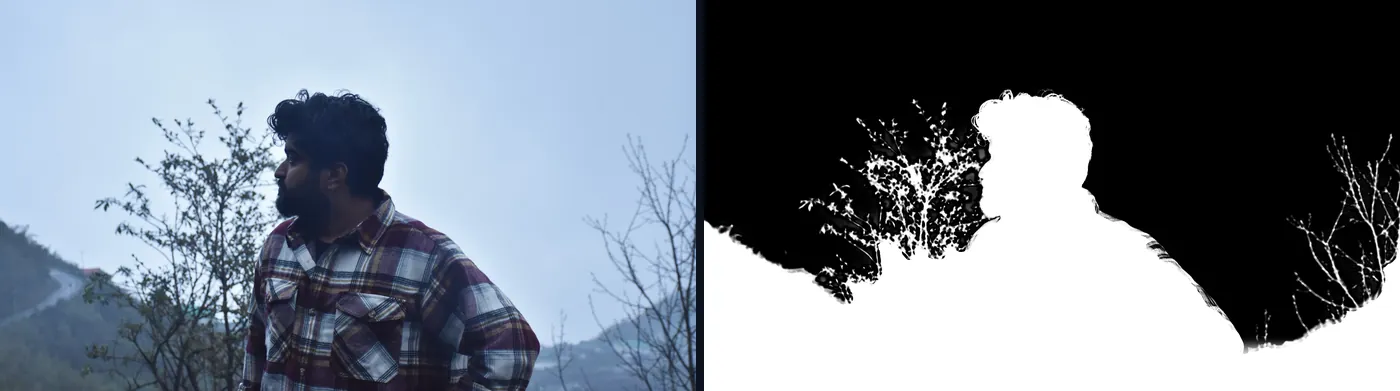
A matte is a greyscale image in which white keeps the foreground and black reveals what’s behind it. The hard part here was the out-of-focus leaves, whose edges blur into the sky. A first version with one global threshold gave them pale fringes, because it judged every blurred edge against one fixed threshold.
The fix measures coverage against the local foreground. A pixel’s distance from the clean plate is the larger of its brightness drop and 0.7 × its colour distance. That distance is divided by the strongest value within 23 pixels, found with SciPy’s maximum filter. A leaf edge half as dark as its leaf gets about half coverage, which is what a defocused edge physically is.
LB = luma(B)
dl = LB - L                                        # how much darker than the sky
dc = np.sqrt(((G - B) ** 2).sum(-1))               # colour distance from the sky
delta = np.maximum(dl, dc * 0.7)
local_full = ndi.maximum_filter(delta, size=23)
local_full = ndi.gaussian_filter(local_full, 4)
alpha = np.clip(delta / np.maximum(local_full, 0.22), 0, 1)
alpha = smoothstep(0.08, 0.95, alpha)
# deep inside the foreground: solid
dist_to_sky = ndi.distance_transform_edt(~sky0)
alpha = np.where(dist_to_sky > 14, 1.0, alpha)
The divisor never drops below 0.22, so faint noise in open sky stays transparent. Anything more than 14 pixels from the sky is forced solid, and the bottom of the frame fades to solid ground between 86% and 92% of its height.
Removing the sky from the edges
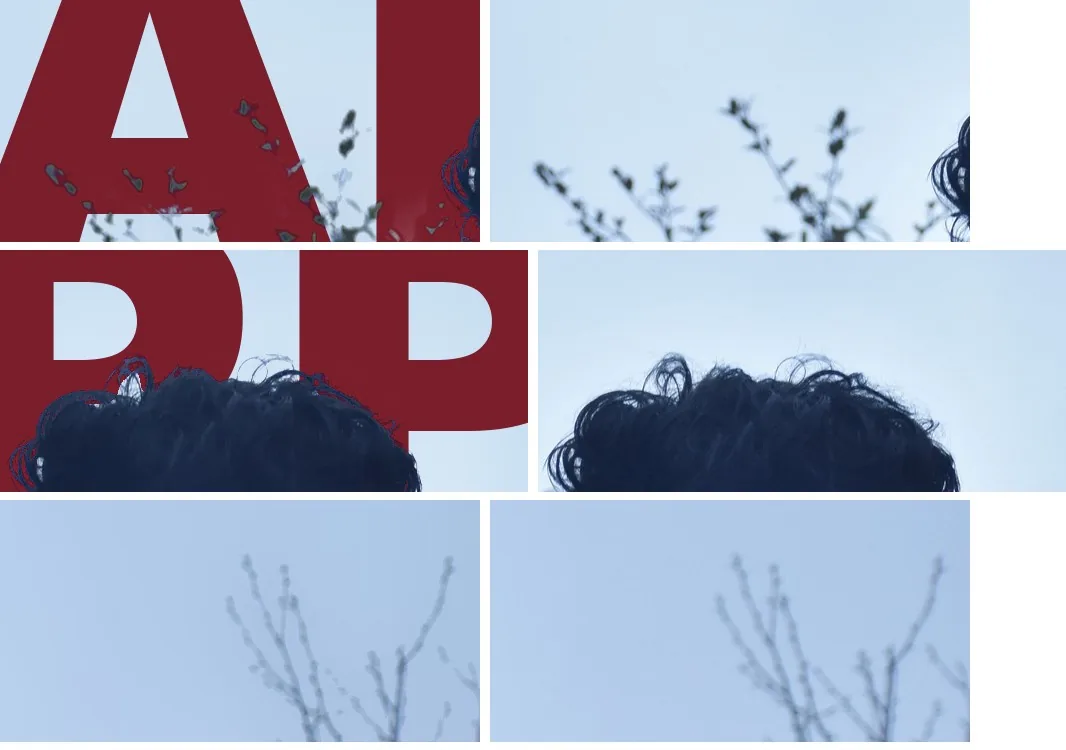
Edge pixels are mixtures. A strand of hair against the sky records part hair and part sky, and if it’s laid over a red title unchanged, the sky share shows up as a pale halo. Colour decontamination removes the background’s share before compositing.
Every observed pixel follows I = α·F + (1 − α)·B, where α is the matte value, B is the background (the clean plate) and F is the true foreground colour. Rearranged, F = B + (I − B) / α. The pipeline applies this wherever α is above 0.04 and leaves near-transparent pixels alone, because dividing by a tiny α would be unstable.
a3 = np.maximum(alpha, 0.04)[..., None]
F = np.clip(B + (G - B) / a3, 0, 1)
F = np.where(alpha[..., None] > 0.04, F, G)
# …
rgba = np.dstack([F, alpha])
fg = Image.fromarray((rgba * 255 + 0.5).astype(np.uint8), 'RGBA')
for w in (2400, 1600, 1000):
    h = round(H * w / W)
    fg.resize((w, h), Image.LANCZOS).save(OUT / f'fg-{w}.webp', quality=82, method=6, alpha_quality=90)
An 1800-wide copy (344 KB) was added later: on a 1440 × 900 screen the image’s sizes value resolves to 1602 pixels, and the browser was fetching the 2400 file.
Six layers in the browser
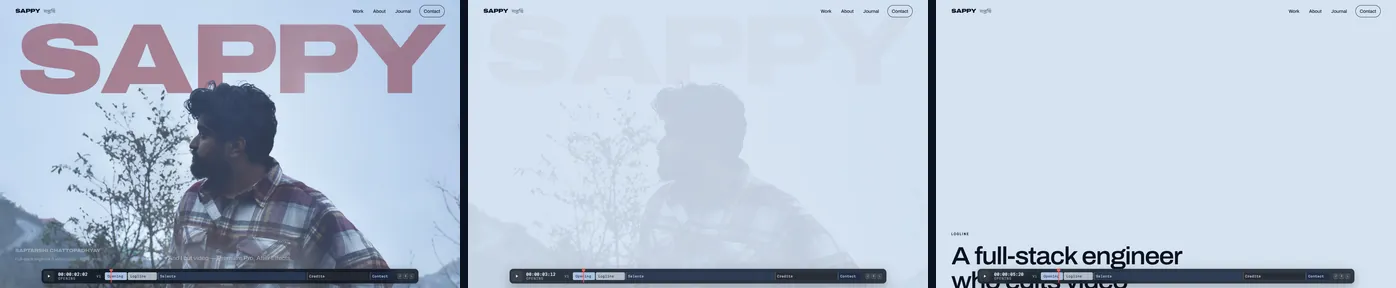
On the page, the composite is a stack of absolutely positioned layers inside one sticky frame:
- The clean sky plate.
- The
h1title, real text set in Archivo at 125% width. - The back mist canvas, which veils the title like distant haze.
- The foreground cut-out, covering the title wherever the figure, trees or hills are.
- The front mist canvas: low valley mist over the hills.
- A plain mist-coloured veil that finishes the scroll dissolve.
Because the title is real text, search engines and screen readers can read it. The visible word is aria-hidden, and a visually hidden span gives the full name and role.
.hero-layer {
  position: absolute;
  left: var(--bx);
  top: var(--by);
  width: var(--bw);
  height: var(--bh);
  transform-origin: 47% 30%;
  /* … */
}
.hero-layer--plate img {
  top: -100%;
  height: 200%;
}
.hero-layer--fg {
  translate: calc(var(--px) * -20px) calc(var(--py) * -10px);
  scale: calc(1 + var(--p) * 0.17);
}
At full pointer deflection the sky moves 5 pixels, the title 9 and the cut-out 20, and that difference reads as depth. The frame stays pinned for one screen of scrolling, over which the foreground scales up 17% around the head, the title rises and fades, and the mist thickens. On load, the picture grades in from flat over 2.4 seconds while the title pulls focus from a 16-pixel blur.
Sizing the title to any screen
The title has to span the frame, sit at a fixed depth behind the head and clear the header, on everything from phones to ultrawide monitors. No fixed font size can do that, so the hero measures the font and solves the layout in JavaScript.
It renders the word at 100 pixels to get its width per pixel of font size, and reads the cap height, ascent and descent with the canvas measureText method. The word is sized to the frame minus its gutters, capped so the capitals never exceed 36% of the frame height, and placed so the head covers 42% of the letter height. If that would tuck it under the header, the whole picture shifts down and the extended plate fills the gap.
const gutter = Math.max(16, fw * (landscape ? 0.035 : 0.055));
let size = (fw - gutter * 2) / m.width;
size = Math.min(size, (fh * 0.36) / m.cap);
const capH = size * m.cap;
const headTop = by + HEAD_TOP * bh;
let capTop = headTop + capH * OVERLAP - capH;
const minTop = Math.max(84, fh * (landscape ? 0.13 : 0.16));
if (capTop < minTop) {
  const shift = minTop - capTop;
  by += shift;
  capTop += shift;
}Measuring before the web font loads measures the fallback font, so the hero waits for the exact face with document.fonts.load. The title still overflowed. The real cause was letter-spacing: -0.04em on the h1: CSS resolves an em letter-spacing to an absolute length where it’s declared, and children inherit that length. The span measured at 100 pixels inherited spacing computed for the huge title, so the title came out too wide. Declaring the spacing on the span fixed it.
Two layers of WebGL mist
The mist is one fragment shader drawn into two transparent canvases, one behind the cut-out and one in front. It uses domain-warped fractal noise: five octaves of value noise whose coordinates are pushed around by more noise, so shapes billow instead of sliding. A smoothstep turns noise into density, and a height term pools it in the valley. It’s a small example of the WebGL work this site offers.
void main() {
  vec2 uv = gl_FragCoord.xy / uRes;
  float aspect = uRes.x / uRes.y;
  vec2 p = vec2(uv.x * aspect, uv.y) * 1.3 + uSeed;
  float t = uTime;
  vec2 warp = vec2(fbm(p + vec2(t * 0.020, t * 0.007)), fbm(p + vec2(5.2 - t * 0.013, 1.3)));
  float n = fbm(p * 1.7 + warp * 1.25 + vec2(-t * 0.05, 0.0));
  float pool = mix(1.0, smoothstep(uTop, 0.0, uv.y), uLow);
  float d = smoothstep(0.40, 0.88, n) * pool * uDensity;
  vec2 m = (uv - uMouse) * vec2(aspect, 1.0);
  d *= 1.0 - 0.85 * smoothstep(0.30, 0.0, length(m)) * uMouseAmt;
  d = clamp(mix(d, 1.0, uDissolve), 0.0, 1.0);
  gl_FragColor = vec4(uColor * d, d);
}
The back layer spreads through the frame. The front layer fades out by mid-height, so it drifts over the hills without fogging the face. Both render at half resolution with a mouse and about a third on touch screens, since mist is soft. The cursor clears a soft hole. Scrolling raises the front layer’s dissolve until the frame is solid #D6E3F2, the page’s mist colour, so the next section starts on exactly that colour.
One bug appeared only in development. React’s Strict Mode mounts components, runs their effect cleanups and mounts them again, to expose missing cleanup. The cleanup called loseContext() from the WEBGL_lose_context extension. A canvas returns the same context on every getContext call, so the remount got a deliberately lost context, and every shader compile failed with an empty log. The fix: delete the buffer and program on cleanup, and leave the context alive.